


FAQs
How do I contact Mac Duggal customer service?
We are always here to assist you with any questions or concerns you may have.
For the best service, we recommend contacting us via email at [email protected].
If you prefer to speak with us over the phone, feel free to give us a call at 909-316-5758 and we'll be happy to assist you. Our regular business hours are Monday-Friday 9:00 am - 5:00 pm CST.
For international orders, please contact us via email at [email protected].
For press inquiries, email [email protected].
For partnership/influencer inquires, email [email protected].
How do I remove the red security tag?
Red Security Tag Removal Instructions
Cut along the thin part of the red tag, on the side furthest from the dress. There is a scissor icon near the edge you will cut along.
Once you cut along the edge, the tag will then pull apart and separate.
How do I review my wishlist?
How do I see the dresses and items I ❤ ed with wishlist?
On desktop you can view wishlist chosen styles on the top menu bar by choosing the heart icon, but for mobile you will need to click on the 3 bars on the top right to pull out the full menu down. Wishlist is located at the bottom of the pop out menu if you scroll down.
Click on the word Wishlist and your favorited styles will be displayed.
From there you have 3 options:
1. Share your wishlist (Via text or email)
2. Add your wishlist to cart
3. Clear your wishlist
How I can I become an authorized Mac Duggal retailer?
Thank you for your interest in becoming an authorized Mac Duggal retailer.
To begin the application process, please email [email protected] with the following information:
- Store name
- Store address
- Website URL
- Primary contact name
- Phone number
- Employer Identification Number (EIN), if located in the United States
Our team carefully reviews each application to ensure alignment with our brand and retail partnerships. Please allow up to two weeks for the review process.
Once your application has been reviewed, a member of our team will contact you using the phone number provided.
If you have any questions or need additional assistance, please feel free to reach out. We appreciate your interest in partnering with Mac Duggal.
Discounts and Promotions
Do you have any discounts available?
Do you have any discounts available?
- Yes! You can enjoy a 10% discount on your first order and get access to exclusive offers by subscribing to our newsletter.
Simply click on "Sign Up for Updates" in the footer of our website and provide your email and you'll receive a code via email to use at checkout. Happy Shopping!

- Please note we do not allow multiple promotional codes to be used at the same time.
How can I add a promo code?
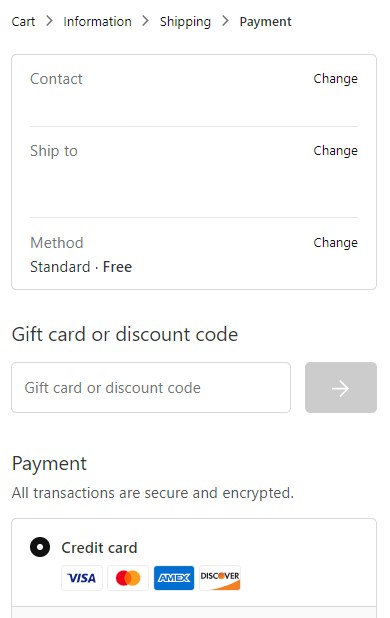
Please enter your promo code during the checkout process in the “Gift Card or discount code” box. Be sure to click “Apply”.
Please note:
- Only one promo code can be used per order.
- Sale and Last Chance items have already been discounted and are not eligible for promo codes.
- For a complete list of exclusions and terms, refer to individual promo code policies.
Mobile View
My promotional code is not working.
We’re happy to help! Before reaching out, please review the following common reasons a promotional code may not apply to your order:
- The promo code has expired.
- The promo code has already been used.
- The item(s) in your cart may not be eligible for promotion.
- The promo code may only apply to select styles, categories, or collections.
- Only one promotional code may be used per order.
- Welcome 10% discount codes cannot be combined with other store promotions or coupon codes.
- Promotional codes must be applied during checkout and cannot be applied once an order has been completed.
- Please review the terms and conditions associated with your code for full eligibility details.
If your promotional code is still not working and you believe it is valid, please contact our Customer Care team at [email protected] for assistance.